Automations
Turn a LinkedIn profile into call notes, without scraping anything
Get a one-page brief on someone before a call by reading the profile already open in your browser. Why bulk scraping is the wrong tool, and what to build instead.
You have a call in ten minutes with someone you have never met. You open their LinkedIn, skim it, and by the time the call starts you have retained approximately their job title.
This is a good automation candidate: repetitive, low-judgment, and you do it badly under time pressure. But it is also the automation most likely to get built the wrong way, so it is worth being careful about how.
The wrong way, and why it is tempting
The obvious approach is a scraper. Feed it a list of profile URLs, have it fetch each one, parse the HTML, dump the results into a spreadsheet.
Do not do this, for three reasons that are all practical rather than preachy.
LinkedIn’s terms prohibit it and they enforce it. Not with a stern letter. With account restrictions, and often on the account of the person doing the scraping. The asset you are risking is your own professional network.
It breaks constantly. LinkedIn changes its markup, adds challenges, and rate-limits aggressively. A scraper is a thing you maintain forever in exchange for data you needed once.
The data brokers selling you a way around this are worse. Those enriched contact databases were assembled by exactly the scraping you were trying to avoid, and using them moves the terms problem to a vendor while adding a data protection problem of your own.
The distinction that matters
There is a real difference between two activities that look superficially similar.
Bulk collection: systematically harvesting profiles you have no relationship with, at volume, into a database, to be used later. This is what the terms are aimed at, and reasonably so.
Reading the page in front of you: you opened a profile, in your own browser, in your own logged-in session, because you are about to talk to this person. Something on your machine reads what is already rendered on your screen and writes you a summary.
The second one is a person doing what a person does, with better note-taking. There is no automated crawl, no volume, no database of people you have never spoken to. It is closer to a browser extension that reformats a page than to a scraper.
This guide builds the second one. The scale is one person, right before you talk to them, initiated by you.
What you are actually building
Trigger: a calendar event starting in fifteen minutes, with an external attendee.
Steps:
- Read what is on screen (the profile you have open).
- Ask for a specific brief, not a summary.
- File it against the person, and put a card up before the call.
Three steps. The interesting one is the middle.
Writing the instruction that makes it useful
A summary of a LinkedIn profile is worthless, because a LinkedIn profile is already a summary. What you want is the things you would have noticed if you had twenty minutes instead of two.
Bad:
Summarise this profile.
Good:
From this profile, give me:
- Their current role, and roughly how long they have been in it.
- The move before this one, and whether it looks like a step up, a sideways move, or a change of field.
- Anything we plausibly have in common: a shared employer, city, school, or industry.
- One thing worth asking about that is not on their headline. Keep it under 120 words. If the profile is thin, say so rather than padding.
That last line matters more than it looks. Half of LinkedIn profiles are three lines and a stock photo. Without explicit permission to say “there is not much here”, you get a confident paragraph of inference dressed as fact, which is worse than nothing because you might repeat it out loud.
The “how long in the role” question is quietly the most useful one. Someone six weeks into a job has different problems than someone six years in, and it changes what the call should be about.
Making it stick
A brief you read once and lose is a brief you will regenerate next time. The step that compounds is filing it against the person.
Halo keeps a private record per person, built only from your own meetings and messages, so the profile notes attach to that record rather than living in a document you will not find again. Next time their name comes up in an email, the context is already there. Three calls in, you have a real history: what they said they would send, what they were worried about last quarter, what you promised.
That is the actual payoff. The first run saves you ten minutes of skimming. The tenth run means you walk into a call already knowing the person, which is not a time saving at all, it is a different quality of conversation.
The privacy part, which is not optional
You are building a file on people. That deserves some care, and most of it is architectural rather than a matter of intent.
Keep it local. These notes are about identifiable people who did not consent to being profiled by your software. The safest place for that is a machine only you can reach. On Halo this is the default: the person records live in a local database on your Mac, not on a server.
Keep it to people you actually deal with. A record created because you had a meeting is a note. A database of everyone in an industry is a data protection question with your name on it.
Only your own sources. Notes built from your meetings, your messages, and pages you opened are records of your own relationships. Notes bought from a broker are somebody else’s surveillance, and in the EU and UK you inherit the legal exposure when you use them.
Be able to delete it. If you cannot remove a person and everything attached to them in one action, you have built something you cannot honestly answer a deletion request about.
None of this is legal advice, and if you are doing this at organisational scale you want someone who does that for a living. At the scale of “I take notes on people I meet”, the above is the reasonable line.
What to build after this one
The same shape, read a page you have open, ask a specific question, file the answer, generalises further than it looks:
- A pricing page for a competitor, checked monthly, telling you only what changed.
- A candidate’s portfolio before an interview, with three specific questions about their work.
- A supplier’s terms page, watched for the clauses you care about.
The pattern is always: something is on screen that you would read carelessly, and a specific question turns it into something you would act on.
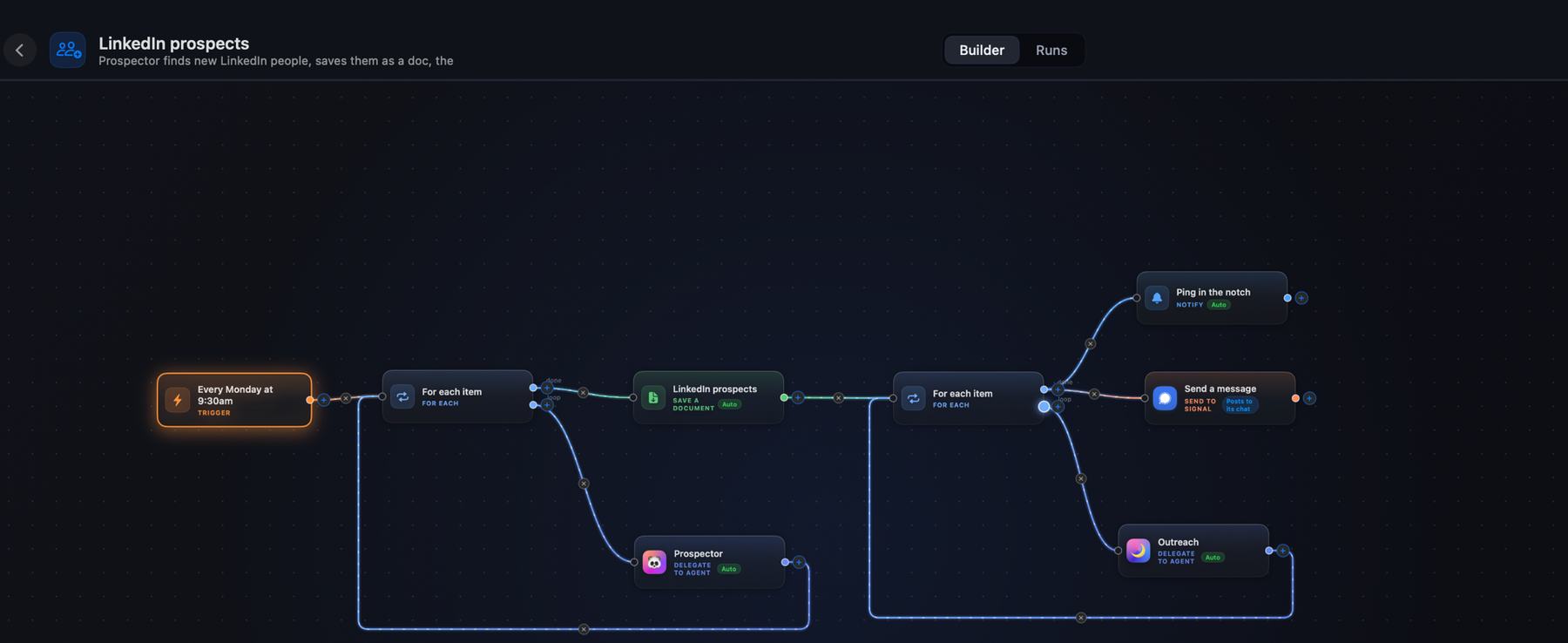
Once the one-off version earns its place, the same shape runs on a schedule:
Note what the end of that flow does and does not do. It saves a document, puts a card in the notch, and sends a message to my own Signal chat. The outreach step drafts. Nothing goes to any of the people in the list without me reading it first, which is the same rule as everywhere else: the automation does the assembly, you keep the send.
If you have not built an automation before, start with the basic shape and come back to this one. Otherwise, see how Halo handles people and context.
- automations
- crm
- sales
- meeting prep